 Topit
Instagram Photo Dump: How to Choose the Photos and the Order
A photo dump is a carousel that is meant to feel unplanned. The good ones are planned anyway. Here is how to choose what goes in, what stays out, and what goes first.
The short answer
Pull everything from the period into one place, then cut to one photo per moment. Choose a through-line (a trip, a month, a mood), mix shot types so every swipe shows something new, and lead with the one photo that works on its own. Put a strong, different photo second, because Instagram may show it to people who skipped the first.1 Crop everything to the same ratio, 4:5 portrait if you can.4
A photo dump is curated to look uncurated. The casual feel comes from the variety, not from the lack of choosing.
average engagement for carousels in 2025, the highest of any format, against 0.37% for single images.
Socialinsider3chance: if someone does not swipe, Instagram will often show the carousel again starting at slide 2.
Adam Mosseri via Mashable1Step 1: pull candidates without judging
Pick the window first (this weekend, this trip, October) and select everything in it you would not be embarrassed by. Do not rank yet. Choosing and gathering at the same time is how you end up with the first eight decent photos rather than the best eight.
Step 2: one photo per moment
Bursts and near-duplicates are the main reason dumps feel repetitive. Group the candidates by moment, the same table, the same view, the same five minutes, and keep one from each group. Large piles of similar options can make people less satisfied with what they pick5, so this step also makes the rest of the choosing easier.
Step 3: find the through-line
The best dumps have one thing holding them together that a viewer feels without being told: a place, a stretch of time, a colour, a mood. Once you know yours, cutting gets easy. A photo that is great but belongs to a different story goes in a different post.
Step 4: mix the shot types
Every swipe should show something the last one did not. A useful mix for a ten-photo dump:
| Type | Example | How many |
|---|---|---|
| You | The best photo of you from the period | 1 or 2 |
| Wide | The place, the view, the room | 1 or 2 |
| Close detail | A texture, a sign, a hand, the coffee | 2 or 3 |
| People | Friends mid-laugh, not lined up | 1 or 2 |
| The odd one | The funny, blurry or strange photo people will mention | 1 |
One deliberate blur reads as mood. Three reads as a bad night. Keep the imperfect photos that carry the feeling, and cut the ones that are just imperfect.
Step 5: choose what leads and what comes second
Slide 1 is the only slide most people judge before deciding to swipe, and it is the one your grid shows, so it needs a clear subject at small size. Adam Mosseri, who runs Instagram, has explained that if someone sees a carousel but does not swipe, Instagram will often show it to them again starting from slide 2.1 So slide 2 should be strong and different from slide 1. Our carousel order guide covers the rest of the sequence.
Step 6: stop before it gets long
Mosseri's explanation for why carousels reach more people is that more pieces of media give more chances for interaction.2 That only holds while each photo is worth stopping on. A dump that ends on its weakest photos teaches people to stop swiping your dumps. End on something chosen to end on.
Step 7: one ratio for the whole set
The first slide sets the shape of the whole carousel, so crop every photo to the same ratio before posting. For photos, 4:5 portrait uses the most feed space.4
Frequently asked questions
How many photos should a photo dump have?
As many as each earn a swipe. For most people that is somewhere between six and twelve; past that, repeats creep in.
Should the best photo go first?
The clearest strong photo goes first, which is not always the prettiest. Moody, wide or abstract photos often work better in the middle.
Is it okay to post photos of friends in a dump?
Ask first, especially for anything unflattering or from a night out. A dump is not worth a friend's bad photo.
Is there an app that picks photos for a dump?
Yes. Our Instagram photo picker guide covers the method by hand and the apps that do it for you.
How Topit does it
Choosing a photo dump with Topit
Topit is a photo selector app. Upload a batch of photos, pick where they are going (a dating app, Instagram or LinkedIn), and Topit ranks the whole set for that destination, learns your taste as you compare, and explains every pick. Free to try on iPhone, Android and the web.
The problem
A month of camera roll is hundreds of photos and dozens of bursts, and after twenty minutes of scrolling everything starts to look the same.
How Topit solves it
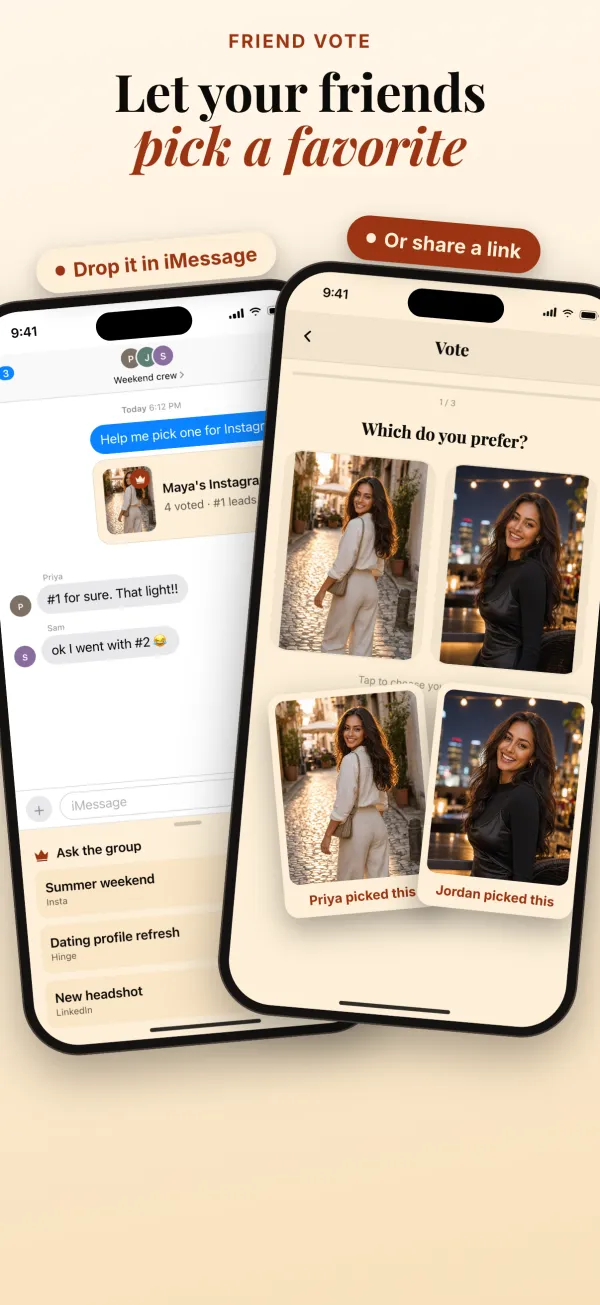
Upload the batch and choose Instagram. Topit ranks the whole set with composition first, collapses each burst to its strongest frame so every moment appears once, and explains every pick. That gives you a lead slide and a varied pool for the rest. Can't decide what leads? Ask friends to vote on the top few.
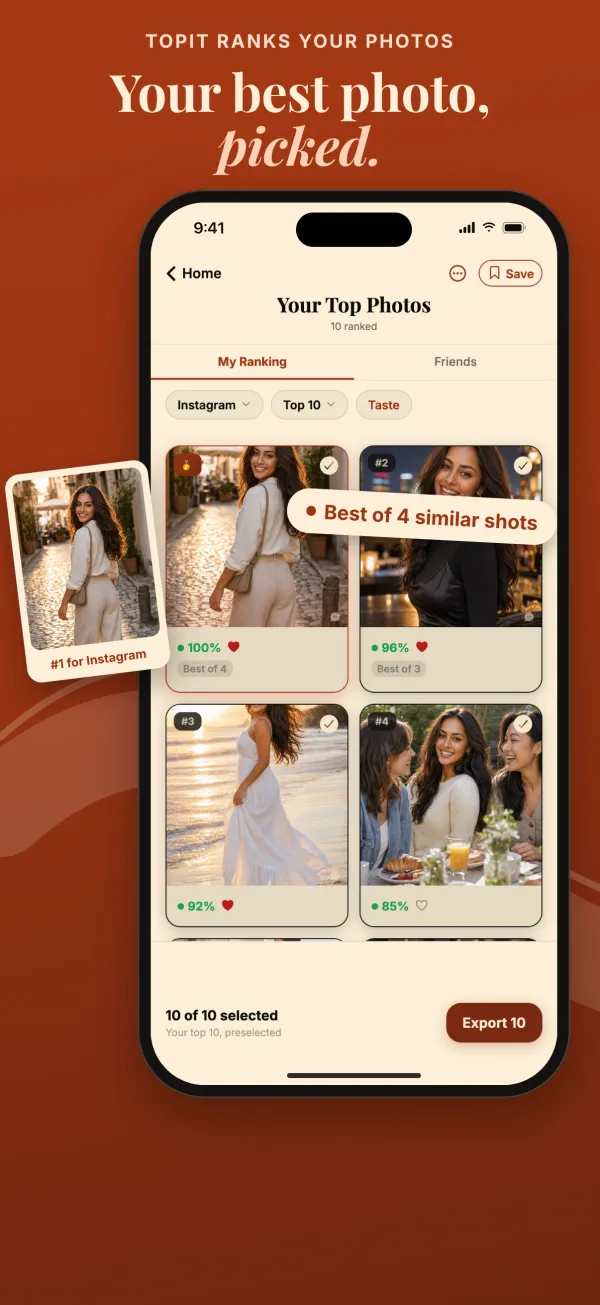
- Ranks the whole set. Upload a batch from your camera roll and get it back in order, with burst shots and near-duplicates collapsed to the strongest one.
- Ranks for the destination. The same photos come back in a different order for each place: dating puts the person and their expression first, LinkedIn a clear face, Instagram composition.
- Learns your taste. A few quick this-or-that comparisons build a profile of what you like, and the ranking leans toward it.
- Explains every pick. Each top photo comes with a reason. Disagree, tell it what you want (more candid, less posed), and it reranks.
- Lets friends vote. Send a shortlist by link. Friends vote without an account, can choose to stay anonymous, and you see who picked what.
Free to try, no credit card. Paid plans, Pro ($4.99/month) and Creator ($14.99/month), are sold in the iPhone app and raise the limits on photos and projects. Only the photos you choose are uploaded, they are kept until you delete the project or your account, and Topit does not sell personal information. Details in the privacy policy.
Sources
- Mashable (October 2024), "Why Instagram carousels sometimes start on the second slide", reporting Adam Mosseri. mashable.com/article/instagram-engagement-carousels-second-slide
- Adam Mosseri on Instagram (October 2024): "Carousels often get more reach than single photo posts". www.instagram.com/p/DBOeUmTSmIC
- Socialinsider, Instagram benchmarks (2025 organic engagement rate by format, about 35 million posts). www.socialinsider.io/social-media-benchmarks/instagram
- Buffer, Instagram image size guide (1080 x 1350, 4:5 portrait). buffer.com/resources/instagram-image-size
- Chernev, Bockenholt and Goodman (2015), "Choice overload: a conceptual review and meta-analysis", Journal of Consumer Psychology 25(2). www.sciencedirect.com/science/article/pii/S1057740814000916