 Topit
Professional
LinkedIn Headshot Picker: How to Choose From the Photos You Have
Most advice tells you how to take a LinkedIn photo. This is for the step after: you already have the candidates, and you need to pick one.
The short answer
First cut everything that fails LinkedIn's own basics: not solo, not recent, face too small, or below 400 by 400 pixels.1 Then shrink the survivors to the size LinkedIn actually shows them, a small circle, and compare them in pairs. Keep the one where your face and expression still read at that size. Before you upload, get one outside opinion, because strangers choose better photos of us than we do.2
Our LinkedIn profile picture guide covers what makes a good one. This guide assumes you already have options, from a photographer's proof gallery, an office headshot day or your own camera roll, and need a method to get to one.
more likely to be viewed: LinkedIn's figure for profiles that simply have a picture.
LinkedIn, 20241of the frame is how much LinkedIn suggests your face should fill: top of the shoulders to just above your head.
LinkedIn, 20241square is LinkedIn's minimum recommended size. It accepts up to 7680 by 4320 and 8 MB.
LinkedIn, 20241Step 1: cut on the hard rules
These take seconds per photo and usually remove more than half the pile. Every one comes from LinkedIn's own advice:1
| Rule | Cut it if |
|---|---|
| Recent | It is more than a few years old, or your hair, glasses or facial hair have changed |
| Solo | Anyone else is in it, including a cropped-out shoulder |
| Face fills the frame | You cannot crop it so your face is about 60% of the frame without it going soft |
| Sharp enough | It is under 400 by 400 pixels, blurry, or a photo of a photo |
| Taken by someone else | It is a front-camera selfie, which is lower quality and may be mirrored |
Step 2: the thumbnail test
Nobody sees your LinkedIn photo the way you see it on your laptop. They see a small circle beside a comment, a message or a search result. Judge the circle, not the rectangle.
Crop each survivor to a square, shrink it to roughly the size of a fingernail on your screen, and put them all side by side. Differences that felt important at full size, a stray hair or a slightly different tilt, vanish. What remains is whether your face is clear and whether the expression reads. People form an impression of a face in about a tenth of a second3, which is about as long as anyone looks at a comment avatar.
Step 3: compare in pairs, not all at once
Forty proofs on one screen is a recipe for choosing nothing. Large choice sets can make people less satisfied with what they pick and more likely to defer.4 Instead, run a knockout: put two side by side, keep the better one, bring in the next. You only ever answer one question, which of these two, and the answer is usually obvious.
When two photos survive to the end and they are nearly identical, stop. Either is fine, and the time is better spent on your headline.
Step 4: choose the expression for your field
LinkedIn's own advice is that smiling generally makes you look more approachable, and that if your personal brand is more serious, it is fine to look serious.1 It also points to a study of 800 profile photos where smiling photos were rated more likable, competent and influential, and smiles showing teeth twice as likable as closed-mouth ones.1 Pick the expression that matches how you want the people you work with to read you, then pick the photo where that expression looks natural.
Step 5: get one outside read
In research on profile photos, people chose less flattering images of themselves than strangers chose for them.2 Show your final two or three to someone in your field who does not know you well, and ask which one they would trust to run a meeting. That person is much closer to your real audience than you are.
Light edits LinkedIn lets you make
LinkedIn's photo editor offers filters and adjustments to brightness, contrast, saturation and vignette, and lets you crop.5 Use it to fix exposure and the crop. If a photo needs more than that, it is the wrong photo.
Frequently asked questions
What size should a LinkedIn profile photo be?
LinkedIn recommends between 400 by 400 and 7680 by 4320 pixels, up to 8 MB.1
Do I need a professional headshot?
No. LinkedIn says a recent professional headshot is often a good bet and typically costs $200 to $400, and that a smartphone camera will also do the trick.1
The photographer sent 50 proofs. Where do I start?
Cut on the hard rules, then run the thumbnail test on what is left. Most proof galleries collapse to five or six real candidates within a few minutes.
Can I use the same photo on my resume or portfolio?
Usually yes, and it helps people recognise you. See our guide to choosing a photo for a resume or portfolio.
How Topit does it
Picking a LinkedIn photo with Topit
Topit is a photo selector app. Upload a batch of photos, pick where they are going (a dating app, Instagram or LinkedIn), and Topit ranks the whole set for that destination, learns your taste as you compare, and explains every pick. Free to try on iPhone, Android and the web.
The problem
A headshot session hands you dozens of near-identical proofs, a camera roll adds more, and at thumbnail size the differences you agonise over mostly disappear.
How Topit solves it
Upload the batch and choose LinkedIn. Topit ranks the set for it, putting a clear face first, collapses near-identical frames to the strongest one, and explains every pick. Want a colleague's view? Send the top few as a shortlist and see who picked what.
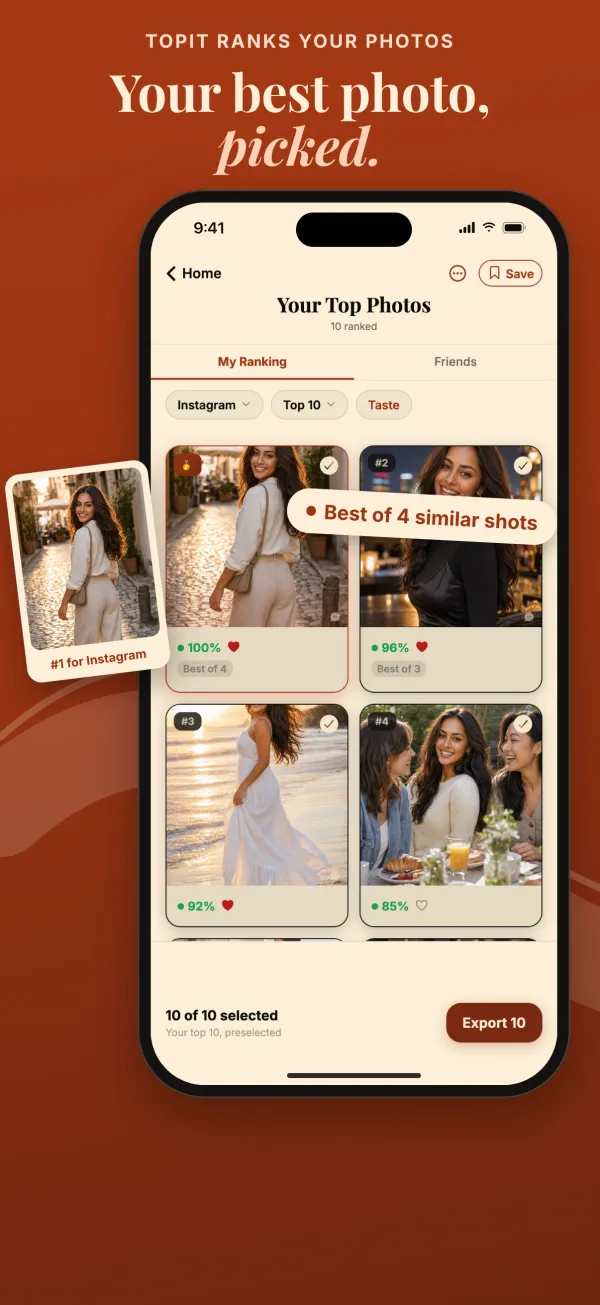
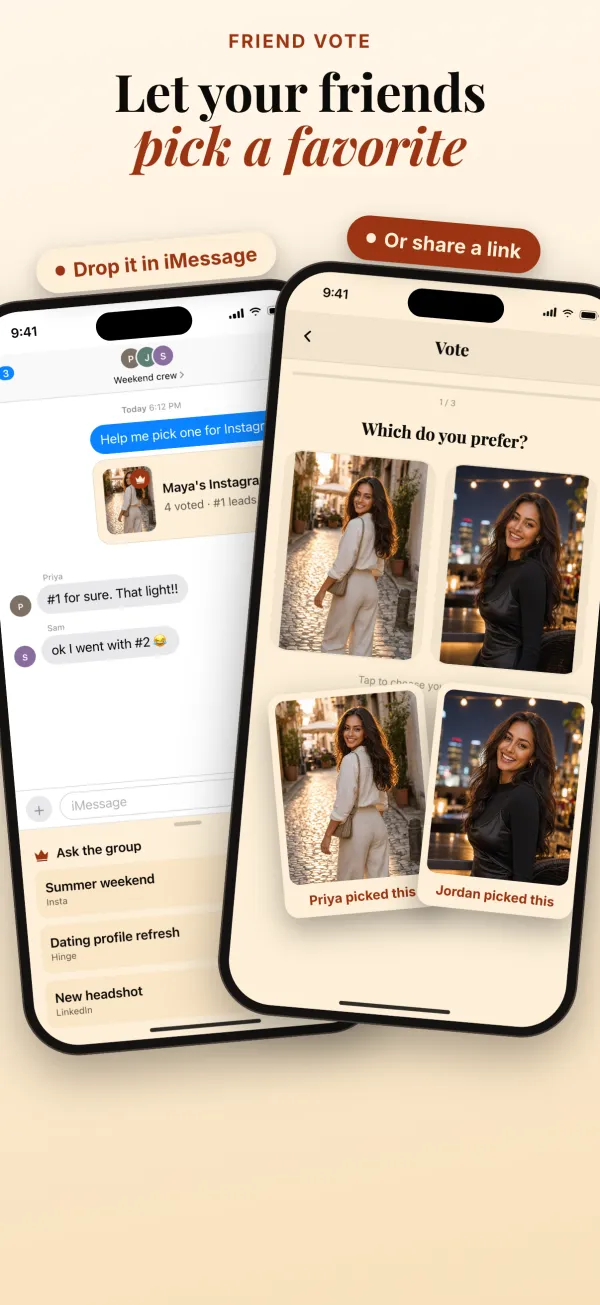
- Ranks the whole set. Upload a batch from your camera roll and get it back in order, with burst shots and near-duplicates collapsed to the strongest one.
- Ranks for the destination. The same photos come back in a different order for each place: dating puts the person and their expression first, LinkedIn a clear face, Instagram composition.
- Learns your taste. A few quick this-or-that comparisons build a profile of what you like, and the ranking leans toward it.
- Explains every pick. Each top photo comes with a reason. Disagree, tell it what you want (more candid, less posed), and it reranks.
- Lets friends vote. Send a shortlist by link. Friends vote without an account, can choose to stay anonymous, and you see who picked what.
Free to try, no credit card. Paid plans, Pro ($4.99/month) and Creator ($14.99/month), are sold in the iPhone app and raise the limits on photos and projects. Only the photos you choose are uploaded, they are kept until you delete the project or your account, and Topit does not sell personal information. Details in the privacy policy.
Sources
- LinkedIn Talent Solutions blog (2024), "10 tips for taking a professional LinkedIn profile photo". www.linkedin.com/business/talent/blog/product-tips/tips-for-taking-professional-linkedin-profile-pictures
- White, Sutherland and Burton (2017), "Choosing face: the curse of self in profile image selection", Cognitive Research: Principles and Implications 2:23. A 2021 correction left the self versus other result standing. pmc.ncbi.nlm.nih.gov/articles/PMC5391387
- Willis and Todorov (2006), "First impressions: making up your mind after a 100-ms exposure to a face", Psychological Science 17(7). pubmed.ncbi.nlm.nih.gov/16866745
- Chernev, Bockenholt and Goodman (2015), "Choice overload: a conceptual review and meta-analysis", Journal of Consumer Psychology 25(2). www.sciencedirect.com/science/article/pii/S1057740814000916
- LinkedIn blog (2017), "LinkedIn profile photo tips: introducing photo filters and editing". www.linkedin.com/blog/member/product/linkedin-profile-photo-tips-introducing-photo-filters-and-editing