 Topit
Photo selector apps
Best AI Photo Selector Apps in 2026 (Free Options Compared)
An AI photo selector looks at your photos and tells you which one to use. The apps differ more than their names suggest: some score one photo, some send it to strangers, and a few rank a whole camera roll for the place the photo is going.
The short answer
- Many similar photos, one destination (a dating app, Instagram, LinkedIn): use an app that ranks the whole set for that destination, such as Topit (iPhone, Android, web) or Picker AI (iPhone).
- One photo, and you want to know how strangers read it: use a human-rating service such as Photofeeler.
- Thousands of frames from a shoot: use a culling tool built for photographers, such as Aftershoot.
- Free: Topit, Picker AI, Photofeeler and RankPic all have a free option. Topit and RankPic also run on Android.
What is an AI photo selector?
An AI photo selector is software that ranks or scores your photos so you can decide which one to use. Most judge the same handful of things: technical quality (sharpness, exposure, noise), the subject (is a face visible, are the eyes open, does the expression read), and composition (framing, background, crop). The better ones also account for where the photo is going, and a few learn your own taste from the choices you make.
It sounds like a small problem. The research says it is not.
of singles aged 18 to 25 say it is hard to choose a profile photo.
Tinder and Opinium, 7,000 people2is how long 18 to 24 year olds spend, on average, choosing one profile photo.
Tinder and Opinium2is enough for a stranger to form a first impression of a face that more time barely changes.
Willis and Todorov, 20063And the person choosing is usually the worst judge available. In two experiments, photos of people chosen by strangers created better first impressions than the photos those people chose of themselves, especially for trustworthiness and competence.1 You remember the evening behind each photo. A stranger only sees the frame.
The four kinds of photo selector
1. Set rankers
You give them a batch and they hand it back in order. This is the right tool when your real problem is thirty near-identical shots and no way to choose. Topit and Picker AI work this way.
2. Human rating
Real people rate your photo. Photofeeler collects ratings on traits for one photo at a time. RankPic asks strangers to rank up to six. This is the most direct measure of how a photo reads to people who do not know you, and it is slower and harder to scale to a big set.
3. Built into the dating app
Tinder's Photo Selector suggests photos from your camera roll6, and Hinge's Top Photo moves the photo it predicts is most likely to get a Like to the front of your profile5. Both only work inside their own app, and both can only choose among photos you already have.
4. Pro culling
Aftershoot and similar tools are built for photographers who come home from a wedding with five thousand frames. They are fast and good at discarding blinks and blur, and they are not designed to tell you which photo to lead a dating profile with.
The main apps compared
Why Topit is our pick
It is the only app in this comparison that covers the whole job: it ranks your entire set for the app the photo is going to, learns your own taste instead of applying a generic standard, collapses near-duplicates, explains every pick, and goes beyond ranking with friend votes on a shortlist. It runs on iPhone, Android and the web, and it is free to start.
Where another tool wins: if you specifically want strangers to rate one photo, Photofeeler is built for exactly that.
| Feature | Our pickTopit | Picker AI | Photofeeler | RankPic | Aftershoot |
|---|---|---|---|---|---|
| Ranks a whole set at once | ✓ | ✓Up to 200 | ✕One photo per test | ✓Up to 6, by people | ✓ |
| Ranks for dating, Instagram or LinkedIn | ✓ | ✓ | Test type only | Not listed | ✕ |
| Learns your own taste | ✓ | Not listed | ✕ | ✕ | Not listed |
| Explains each pick | ✓ | ✓ | Trait scores, notes | ✕Order only | Not listed |
| Collapses near-duplicate shots | ✓ | Not listed | ✕ | ✕ | ✓ |
| Friends can vote | ✓ | Not listed | Strangers vote | Strangers rank | Not listed |
| Instant result | ✓ | ✓ | ✕Waits for votes | ✕Waits for votes | Fast batch |
| Platforms | iPhone, Android, web | iPhone | Web | iPhone, Android | Desktop |
| Free to start | Yes, no card | 4 photos at a time8 | Vote to earn votes | Rank to earn credits | 30-day trial |
| Paid plans from | $4.99/month11 | In-app | $9 for 40 votes7 | $3.99 credit pack9 | $12/month, yearly10 |
Also worth knowing: two dating apps have their own picker. Tinder's Photo Selector suggests photos from your camera roll inside Tinder6, and Hinge's Top Photo moves the photo it predicts will get the most Likes to the front5. Both only work inside their own app. Topit publishes this page and is one of the apps compared; facts about other apps come from their own sites and store listings.
Is there a free AI photo selector?
Yes. Topit is free to try with no credit card, and its paid plans (Pro at $4.99 a month, Creator at $14.99 a month, sold in the iPhone app) raise the limits on photos and projects.11 Picker AI's free tier ranks four photos at a time.8 Photofeeler and RankPic are free if you rate other people's photos to earn votes on yours.79
Is there an AI photo selector for Android?
Yes. Topit is on Google Play and also runs in any browser at mytopit.com, and RankPic has an Android app. Picker AI says it is iPhone only for now.8 The dating-app features (Tinder Photo Selector, Hinge Top Photo) depend on those apps rather than on your phone.
How to choose your best photo, with or without an app
- Decide where it is going first. The same photo can be right for Instagram and wrong for LinkedIn. In the research above, the traits people selected for shifted with the context: attractiveness for dating, competence and trustworthiness for professional profiles.1
- Cut the near-duplicates. Keep one photo per moment, the sharpest one with the best expression. Most of the difficulty in choosing comes from comparing frames that are almost the same.
- Look at it at the size people will see it. A profile photo is seen as a small circle. A feed photo is seen while scrolling. Shrink it and check that the face and expression still read.
- Compare two at a time. Large, complicated choice sets are where people choose worst; a meta-analysis found the effect depends on how hard the comparison is and how unsure you are of what you want.4 Pairwise this-or-that comparisons keep each decision small.
- Get an outside opinion. Someone who does not know you well is closer to your real audience than a close friend, and much closer than you.1
How AI photo selectors judge a photo, and where they fall short
Under the hood most of them combine a few signals: an image-quality score, face and expression detection, composition features, and a model of what tends to work in the destination. The useful ones weight those differently per destination, because a LinkedIn photo and an Instagram photo are doing different jobs.
Their limits are worth knowing. A model's score is a prediction, not a vote from your actual audience. A general model does not know your taste unless it learns it from you. And no selector can fix a set where every photo shares the same problem (bad light, a hidden face); the best it can do is tell you which of them is least bad.
What to check before you upload
You are handing over photos of your face, so read the privacy policy for four things: which photos are uploaded (all of them, or only the ones you choose), how long they are kept, whether you can delete them, and whether they are used to train models. Topit uploads only the photos you choose, keeps them until you delete the project or your account, deletes your account straight away when you delete it, and does not sell personal information. It improves its models with de-identified behavioral signals rather than your raw photos.12
Frequently asked questions
What is the best AI photo selector?
It depends on the job. For ranking many photos for a specific app, a set ranker such as Topit or Picker AI. For how one photo reads to strangers, Photofeeler. For professional culling, Aftershoot.
Is Topit free?
Yes, Topit is free to try with no credit card. Pro ($4.99/month) and Creator ($14.99/month) raise the limits on photos per project and projects per month.
Does Topit work on Android?
Yes. Topit is on Google Play and also works in a phone or computer browser at mytopit.com.
Which AI model does Topit use?
Topit's ranking is its own model, which combines photo quality, the subject, composition and your learned taste, weighted for the destination you choose. It uses third-party AI providers for parts of the work, including Anthropic's Claude for written explanations and AWS Rekognition for image labels, as listed in its privacy policy.12
Can AI pick my dating profile photos?
It can rank them for dating and catch the mistakes people make with their own photos, such as leading with a group shot or using four near-identical photos. The final choice is still yours, and Topit explains each pick so you can disagree with a reason.
How Topit does it
Topit is a set ranker built for where the photo is going
Topit is a photo selector app. Upload a batch of photos, pick where they are going (a dating app, Instagram or LinkedIn), and Topit ranks the whole set for that destination, learns your taste as you compare, and explains every pick. Free to try on iPhone, Android and the web.
The problem
Most people do not have one photo to test. They have forty from the last few months, half of them near-identical, and a dating app, an Instagram post or a LinkedIn profile waiting. Scoring them one at a time does not answer the question they actually have, which is which of these, and in what order.
How Topit solves it
Topit ranks the whole batch for the destination you pick, so the same photos come back in a different order for Hinge than for LinkedIn. It groups near-duplicates and keeps the strongest of each, learns your taste from quick side-by-side comparisons, and explains every pick in plain words.
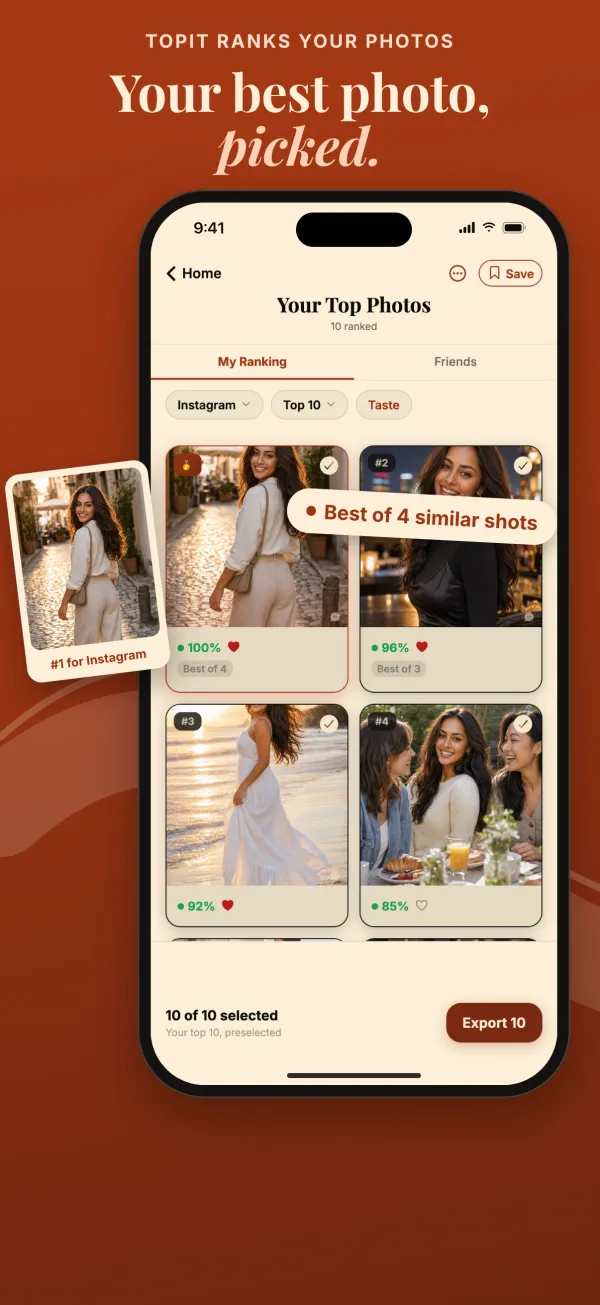
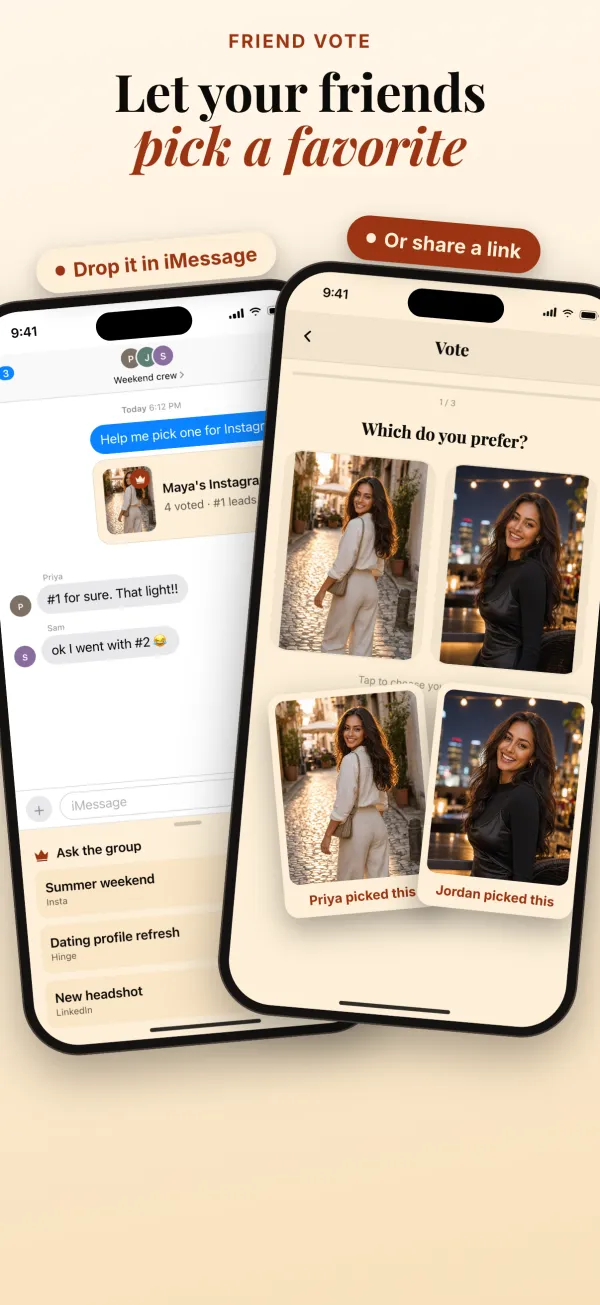
- Ranks the whole set. Upload a batch from your camera roll and get it back in order, with burst shots and near-duplicates collapsed to the strongest one.
- Ranks for the destination. The same photos come back in a different order for each app: dating puts the person and their expression first, LinkedIn a clear face, Instagram composition.
- Learns your taste. A few quick this-or-that comparisons build a profile of what you like, and the ranking leans toward it.
- Explains every pick. Each top photo comes with a reason. Disagree, tell it what you want (more candid, less posed), and it reranks.
- Lets friends vote. Send a shortlist to people you trust and see their picks next to yours.
Free to try, no credit card. Paid plans, Pro ($4.99/month) and Creator ($14.99/month), are sold in the iPhone app and raise the limits on photos and projects. Only the photos you choose are uploaded, they are kept until you delete the project or your account, and Topit does not sell personal information. Details in the privacy policy.
Sources
- White, Sutherland and Burton (2017), "Choosing face: the curse of self in profile image selection", Cognitive Research: Principles and Implications 2:23. A 2021 correction left the self versus other result standing. pmc.ncbi.nlm.nih.gov/articles/PMC5391387
- Tinder press release (July 17, 2024) on Photo Selector, citing an Opinium survey of 7,000 singles aged 18 to 25 in seven countries. www.tinderpressroom.com/Tinder-R-Unveils-Photo-Selector-AI-Feature-to-Make-Choosing-Profile-Pictures-Easier
- Willis and Todorov (2006), "First impressions: making up your mind after a 100-ms exposure to a face", Psychological Science 17(7). pubmed.ncbi.nlm.nih.gov/16866745
- Chernev, Bockenholt and Goodman (2015), "Choice overload: a conceptual review and meta-analysis", Journal of Consumer Psychology 25(2). www.sciencedirect.com/science/article/pii/S1057740814000916
- Hinge Help Center, "What is Top Photo?". help.hinge.co/hc/en-us/articles/26558052212627-What-is-Top-Photo
- Tinder Help Center, "Photo Selector". www.help.tinder.com/hc/en-us/articles/21276850679693-Photo-Selector
- Photofeeler pricing page, checked October 15, 2026. www.photofeeler.com/pricing
- Picker AI website, plans and FAQ, checked October 15, 2026. www.pickeraiapp.com
- RankPic on the App Store, description and in-app purchases, checked October 15, 2026. apps.apple.com/us/app/rankpic-photo-ranking/id1602991264
- Aftershoot pricing page, checked October 15, 2026. account.aftershoot.com/pricing
- Topit on the App Store (in-app purchase prices). apps.apple.com/us/app/topit-ai/id6760445823
- Topit privacy policy (AI service providers, retention and deletion). mytopit.com/privacy