 Topit
Guides
Photo Selection Guides: How to Choose Your Best Photos
How to choose the right photo for the place it is going, using what the research and the platforms' own data actually say. Written by the team behind Topit, a photo selector app.
Start here
Every guide here starts from the same finding: you are the hardest person to choose your own photo for. In research on profile photos, images chosen by strangers made better first impressions than the ones people chose of themselves.1 The guides below give you a method for each destination, and the comparisons show which tools can help.
Dating
- Which Photos Should You Use on Your Dating Profile?What to lead with, what each slot should show, and what the data says about smiling and selfies.
- Which Photo Should You Use on Hinge?Four tests for a first photo, six jobs for six slots, and how Hinge's Top Photo works.
- Best Photos for Hinge: A Checklist for Every Photo You UploadFive questions for every photo, what to cut first, and how to order the rest.
- Best Tinder Profile Picture: How to Choose Your Tinder PhotosA first photo that reads at swipe speed, Tinder's own data and tips, and Face Check.
- Best Bumble Photos: What to Lead With and What to Leave OutBumble's own photo advice, and how Best Photo changes your first three slots.
Professional
- LinkedIn Profile Picture: How to Choose the Right PhotoWhy you do not need a studio headshot, the thumbnail test, and LinkedIn's own numbers.
- LinkedIn Headshot Picker: How to Choose From the Photos You HaveFrom forty proofs to one photo: LinkedIn's specs, the thumbnail test, and pairwise picking.
- Choosing a Profile Photo for a Resume, Portfolio or BioWhen a resume should have a photo, and one photo that works in every crop.
- Which Photo Should You Post on Instagram?How to choose between near-identical shots, and the sizes that survive the crop.
- Instagram Carousel Order: Which Photo Should Go First?Why slide 2 is your second first impression, and how to order the rest.
- Instagram Photo Picker: How to Choose Photos for Your FeedA five-step method from camera roll to post, and the apps that do it for you.
- Instagram Photo Dump: How to Choose the Photos and the OrderOne photo per moment, a through-line, a mix of shot types, and the slide that leads.
Group photos and feedback
- How to Pick the Best Group Photo From a BurstWhy bigger groups need more frames, the face-by-face pass, and the no-veto rule.
- How to Get Honest Feedback on Your PhotosAsk which, not whether; keep votes independent; let people answer anonymously.
Apps and comparisons
- Best AI Photo Selector Apps in 2026 (Free Options Compared)What each kind of photo selector does, which are free, and which run on Android.
- Photofeeler Alternatives: What Each One Is Actually ForHuman voting, AI scoring and set ranking: three different jobs.
- photoselector.app Alternatives: Where to Pick Your Best Photo NowThe site no longer loads. These do the same job.
- RankMyPhotos Alternatives: Apps That Rank Your Photos for YouRanked by AI or by real people, and how to rank them yourself.
For photographers
- Topit Studio: client galleries for photographers, with a taste card for each clientYour client picks their photos in a private gallery; their picks come back as a Lightroom filter.
- Pixieset Alternative That Puts Your Best Photos FirstWhere proofing ends and delivery begins, and which tool does which.
- Aftershoot Alternative for Client Proofing and PicksRAW culling and client proofing are different jobs.
For marketplace and ecommerce teams
- Free Listing Photo AuditTopit Magic Window: which of your listings lead with a weaker photo than one they already have.
- Marketplace listing photos: how to choose the lead photoFive things that make a strong lead photo, and the platform rules to check first.
- Photos on Airbnb-style marketplaces, where hosts upload their ownWhat Airbnb tells its hosts, checked across a whole catalog.
- Alt text for marketplace listing imagesWhat Google and the W3C say, and a pattern for each listing photo.
- Personalized product images: a different lead photo for each shopperChosen from your own photos, measured against a control group.
How these guides are written
Each guide cites its sources: peer-reviewed research where it exists, the platforms' own help pages and published data, and clearly labelled vendor studies where nothing better is available. Product facts about other apps are checked on their own sites and dated. Where Topit is relevant it is described in a separate section at the end of each guide, and comparisons say plainly that Topit publishes them.
How Topit does it
What Topit is
Topit is a photo selector app. Upload a batch of photos, pick where they are going (a dating app, Instagram or LinkedIn), and Topit ranks the whole set for that destination, learns your taste as you compare, and explains every pick. Free to try on iPhone, Android and the web.
The problem
Choosing photos is slow and biased: dozens of near-identical frames, a different standard for every app, and a judge (you) who remembers the moment instead of seeing the frame.
How Topit solves it
Topit ranks a batch of your photos for the place they are going, learns your taste from quick side-by-side comparisons, cuts near-duplicates, and explains every pick. It is free to try on iPhone, Android and the web.
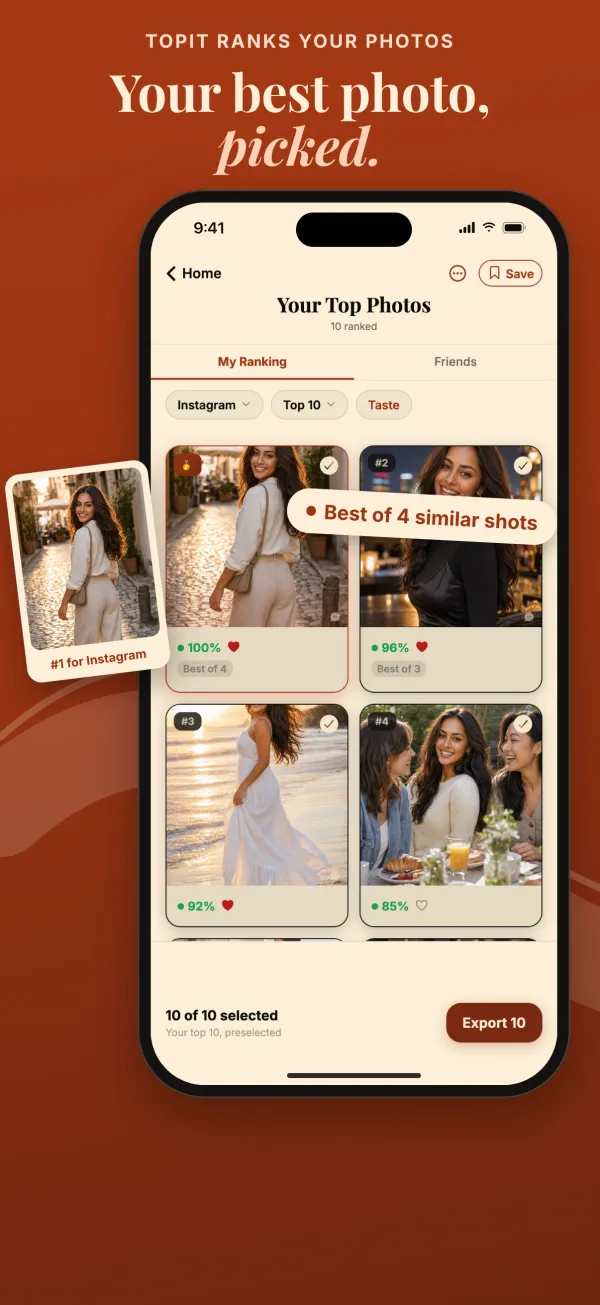
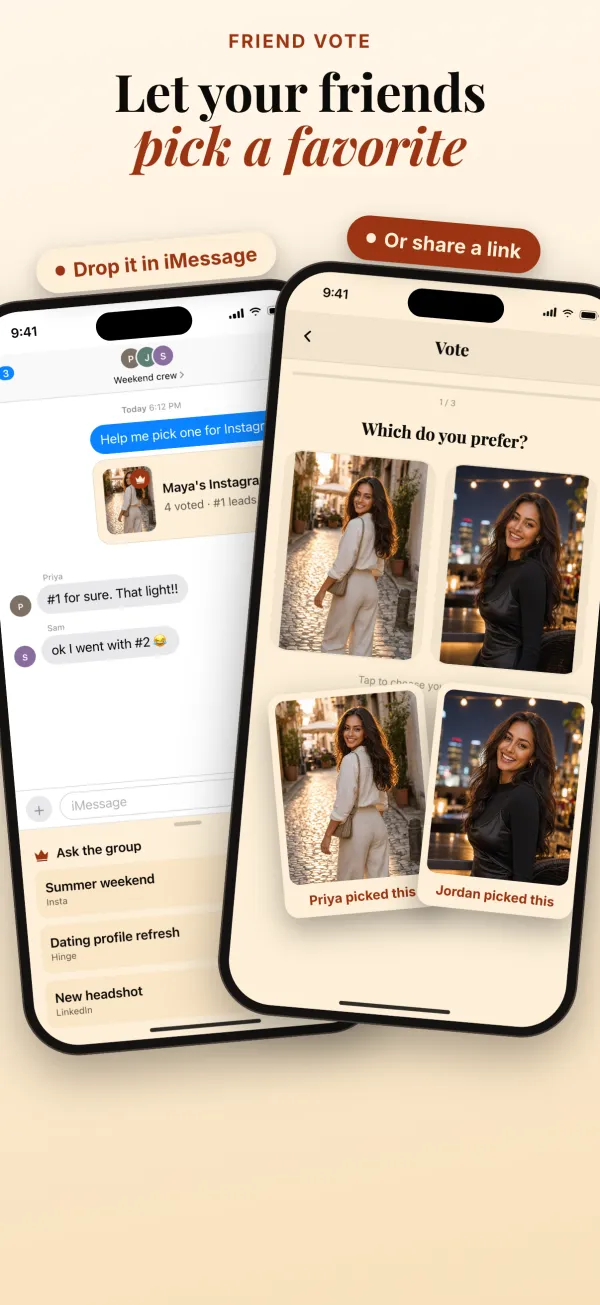
- Ranks the whole set. Upload a batch from your camera roll and get it back in order, with burst shots and near-duplicates collapsed to the strongest one.
- Ranks for the destination. The same photos come back in a different order for each app: dating puts the person and their expression first, LinkedIn a clear face, Instagram composition.
- Learns your taste. A few quick this-or-that comparisons build a profile of what you like, and the ranking leans toward it.
- Explains every pick. Each top photo comes with a reason. Disagree, tell it what you want (more candid, less posed), and it reranks.
- Lets friends vote. Send a shortlist to people you trust and see their picks next to yours.
Free to try, no credit card. Paid plans, Pro ($4.99/month) and Creator ($14.99/month), are sold in the iPhone app and raise the limits on photos and projects. Only the photos you choose are uploaded, they are kept until you delete the project or your account, and Topit does not sell personal information. Details in the privacy policy.
Sources
- White, Sutherland and Burton (2017), "Choosing face: the curse of self in profile image selection", Cognitive Research: Principles and Implications 2:23. A 2021 correction left the self versus other result standing. pmc.ncbi.nlm.nih.gov/articles/PMC5391387