 Topit
Instagram Photo Picker: How to Choose Photos for Your Feed
An Instagram photo picker is any method, manual or app, for getting from two hundred photos to the three you post. Instagram does not do it for you. Here is a method that works by hand, and what the apps add.
The short answer
- Delete blur, blinks and accidental frames.
- Group near-duplicates and keep one per moment.
- Compare the survivors two at a time until you have a shortlist.
- Check each finalist at feed size and in the 3:4 grid crop.
- Post the best one, or the best three to five as a carousel.
An app such as Topit or Picker AI can do steps 1 to 3 for you in seconds.
Why picking from a camera roll is so slow
Picking is a filtering problem before it is a taste problem. Most of a camera roll after an event is near-copies: bursts, retakes, the same group in three poses. Every near-copy you leave in multiplies the comparisons you have to make, and those comparisons are the hardest kind because the differences are tiny.
The research on choice overload is mixed on whether more options always hurts. The classic study found shoppers offered 24 jams were far less likely to buy than those offered 63, but a later meta-analysis showed the effect depends on conditions: it is strongest when options are complex, hard to compare, and you do not have a clear preference.2 Two hundred similar photos is all three.
The five-step method
- Delete the obvious misses. Blur, closed eyes, a thumb in the frame. Do it fast and without deliberating.
- Keep one photo per moment. For each burst or run of retakes, keep the frame with the best eyes and expression and delete the rest. This step alone usually removes most of the roll.
- Compare in pairs. Two side by side, keep one, bring in the next. Small decisions are faster and more consistent than staring at a grid.
- Check at real size. Look at each finalist at feed size, then imagine it in the grid: the grid shows a 3:4 crop, so a 4:5 post loses a little on each side.4
- Decide the format. One clear winner is a single post. Three to five that each do something different is a carousel, which averaged higher engagement than single images in 2025.6 Our guide to carousel order covers the sequence, and the photo dump guide covers the casual, many-photo version.
Get one outside opinion before posting. In profile-photo research, photos chosen by strangers made better first impressions than photos people chose of themselves.1 One friend who was not there is enough.
Instagram photo specs worth knowing
| Format | Size | Note |
|---|---|---|
| Portrait post | 1080 by 1350 (4:5) | Most feed space for a photo4 |
| Accepted range | 1.91:1 to 3:4, 1080 wide | Outside this range Instagram crops5 |
| Profile grid | 3:4 preview | Keep the subject centred4 |
| Carousel | Ratio set by slide 1 | Crop every slide to match4 |
Apps that pick Instagram photos for you
Instagram itself does not choose photos for you. The apps that do fall into two groups:
- AI set rankers. You give them a batch and they return it in order for Instagram. Topit (iPhone, Android, web) ranks for Instagram specifically, cuts near-duplicates and learns your taste.8 Picker AI (iPhone) scores each photo out of 100 for a chosen use case; its free tier ranks four photos at a time.7
- Grid planners. They show how a post will look next to your existing grid. Useful for the last step, though they do not choose between near-identical photos for you.
For a fuller comparison, including human-voting services, see the best AI photo selector apps.
Frequently asked questions
Does Instagram have a photo picker that chooses the best photo?
No. Instagram lets you select photos from your camera roll, but it does not rank them. You need to choose yourself or use a separate app.
What is the best free Instagram photo picker app?
Topit is free to try and ranks a batch specifically for Instagram, on iPhone, Android and the web. Picker AI has a free tier that ranks four photos at a time on iPhone.7
How do I pick photos for an Instagram photo dump?
Use the same method, but optimise for variety rather than quality alone: one photo per moment, different shot types, and a clear first slide.
How Topit does it
Using Topit as your Instagram photo picker
Topit is a photo selector app. Upload a batch of photos, pick where they are going (a dating app, Instagram or LinkedIn), and Topit ranks the whole set for that destination, learns your taste as you compare, and explains every pick. Free to try on iPhone, Android and the web.
The problem
Steps 1 to 3 of the method above are the slow part: throwing out misses, collapsing bursts, and comparing near-identical frames until they all look the same.
How Topit solves it
Topit does those steps for you. Upload the batch, choose Instagram, and it ranks every photo with composition and visual appeal first, groups near-duplicates so only the strongest of each moment makes the cut, and explains each pick. It learns your taste from quick this-or-that comparisons, so the ranking leans toward your feed's look rather than a generic one, and you can export your picks straight from the results.
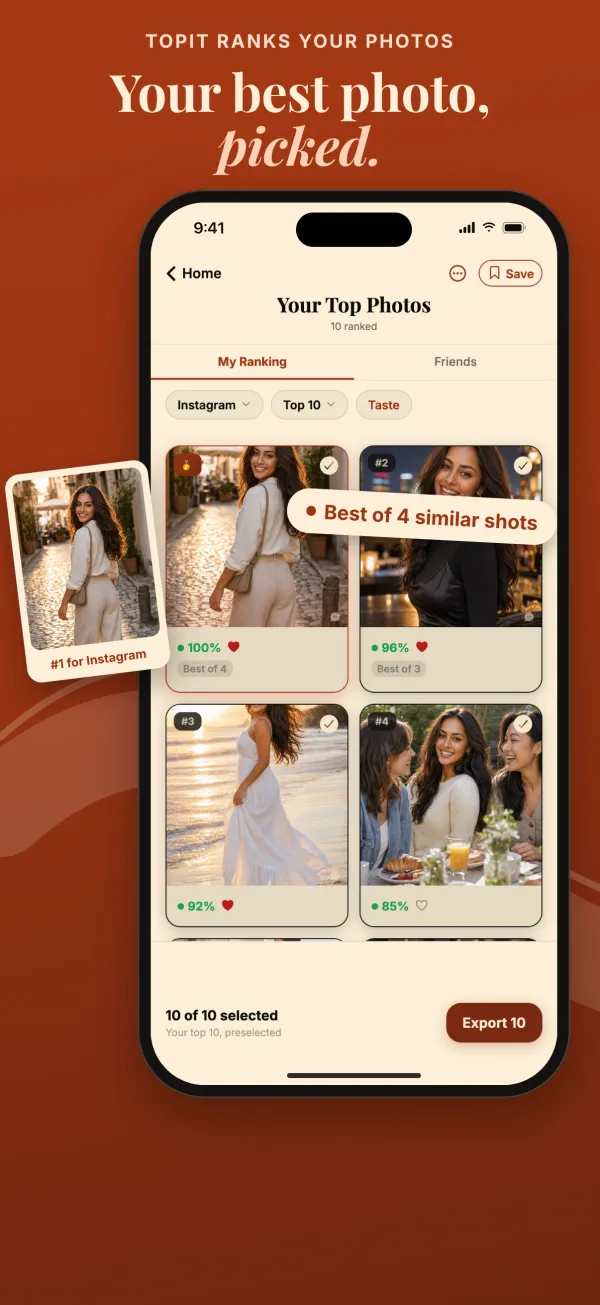
- Ranks the whole set. Upload a batch from your camera roll and get it back in order, with burst shots and near-duplicates collapsed to the strongest one.
- Ranks for the destination. The same photos come back in a different order for each app: dating puts the person and their expression first, LinkedIn a clear face, Instagram composition.
- Learns your taste. A few quick this-or-that comparisons build a profile of what you like, and the ranking leans toward it.
- Explains every pick. Each top photo comes with a reason. Disagree, tell it what you want (more candid, less posed), and it reranks.
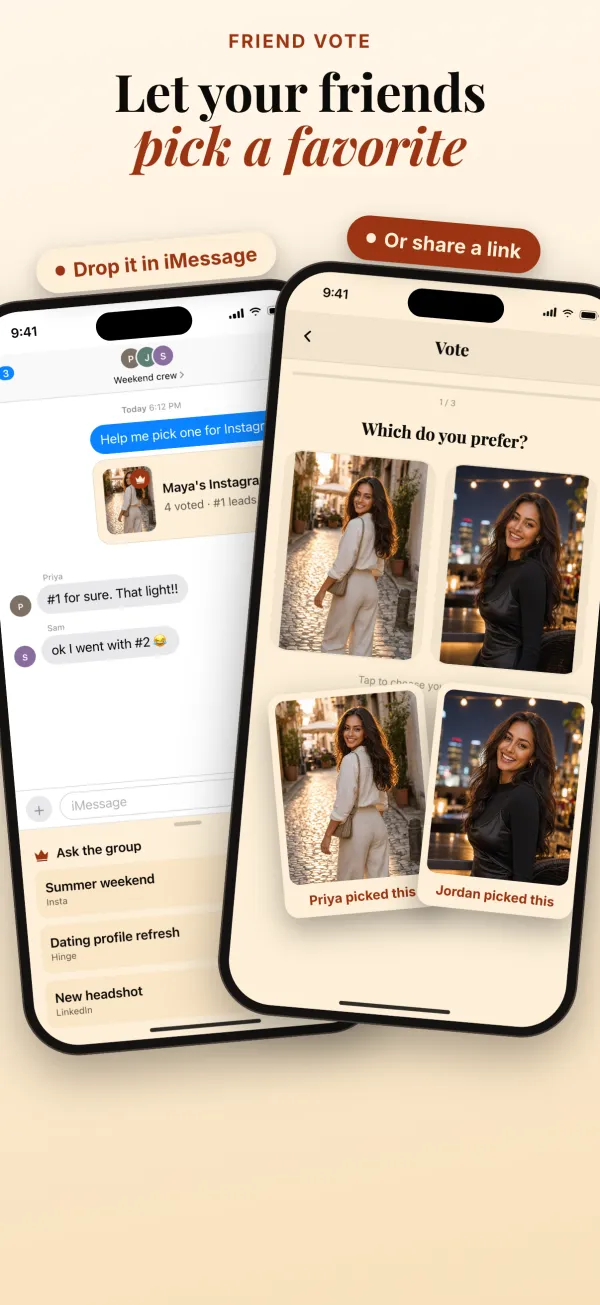
- Lets friends vote. Send a shortlist to people you trust and see their picks next to yours.
Free to try, no credit card. Paid plans, Pro ($4.99/month) and Creator ($14.99/month), are sold in the iPhone app and raise the limits on photos and projects. Only the photos you choose are uploaded, they are kept until you delete the project or your account, and Topit does not sell personal information. Details in the privacy policy.
Sources
- White, Sutherland and Burton (2017), "Choosing face: the curse of self in profile image selection", Cognitive Research: Principles and Implications 2:23. A 2021 correction left the self versus other result standing. pmc.ncbi.nlm.nih.gov/articles/PMC5391387
- Chernev, Bockenholt and Goodman (2015), "Choice overload: a conceptual review and meta-analysis", Journal of Consumer Psychology 25(2). www.sciencedirect.com/science/article/pii/S1057740814000916
- Iyengar and Lepper (2000), "When choice is demotivating", Journal of Personality and Social Psychology 79(6). faculty.washington.edu/jdb/345/345%20Articles/Iyengar%20%26%20Lepper%20(2000).pdf
- Buffer, Instagram image size guide (1080 x 1350, 4:5 portrait). buffer.com/resources/instagram-image-size
- Instagram Help Center, photo resolution and aspect ratios. help.instagram.com/1631821640426723
- Socialinsider, Instagram benchmarks (2025 organic engagement rate by format, about 35 million posts). www.socialinsider.io/social-media-benchmarks/instagram
- Picker AI website, plans and FAQ, checked October 15, 2026. www.pickeraiapp.com
- Topit on the App Store (in-app purchase prices). apps.apple.com/us/app/topit-ai/id6760445823